Adding a New Partner Exchange Rate
Users can add a new Exchange Rate at this screen. Click on the “Add” button located on the top right-hand corner of the page. The Add New Partner Exchange Rate screen will be displayed as shown below.
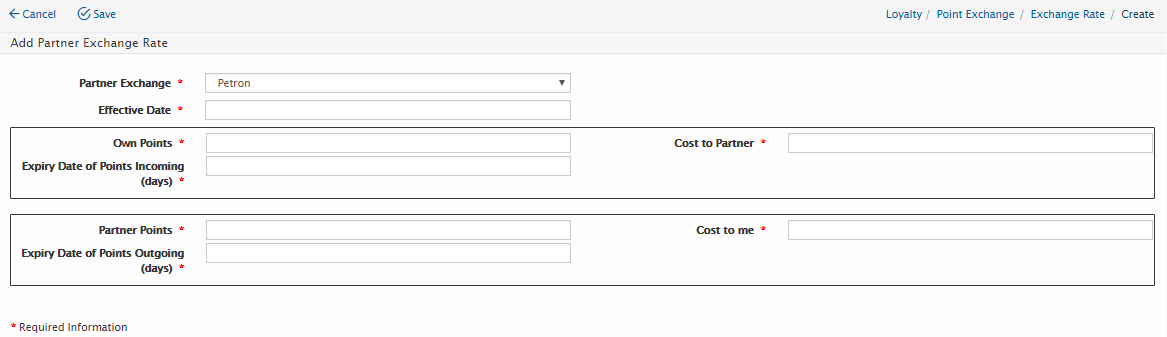
Users will need to enter the following details:
Field Name |
Mandatory |
Length |
Remarks |
Partner Exchange |
Yes |
N/A |
Select Partner from the drop-down list |
Effective Date |
Yes |
Effective date for exchange rate |
|
Own Points |
Yes |
Amount of BSN Points |
|
Cost to Partner |
Yes |
RM Cost to Partner for BSN Points e.g. Own Points =1, Cost to Partner = 0.05 – that means each BSN points cost Partner RM 0.05 which partner must pay to BSN. |
|
Expiry Date of Points Incoming (Days) |
Yes |
Validity of points (in Days) after BSN points added to member |
|
Partner Points |
Yes |
Amount of Partner Points |
|
Cost to Me |
Yes |
RM Cost to BSN for exchanging to Partner Points e.g. Partner Points =1, Cost to Me = 0.03 – that means each Partner points cost BSN RM 0.03 which BSN must pay to Partner. |
|
Expiry Date of Points Outgoing (Days) |
Yes |
Validity period (in Days) of points sent to Partner. |
|
Click on “Save” button to save the details or click on “Cancel” button to cancel the action and return to Partner Exchange Rate Listing page.
Created with the Personal Edition of HelpNDoc: Full-featured Help generator